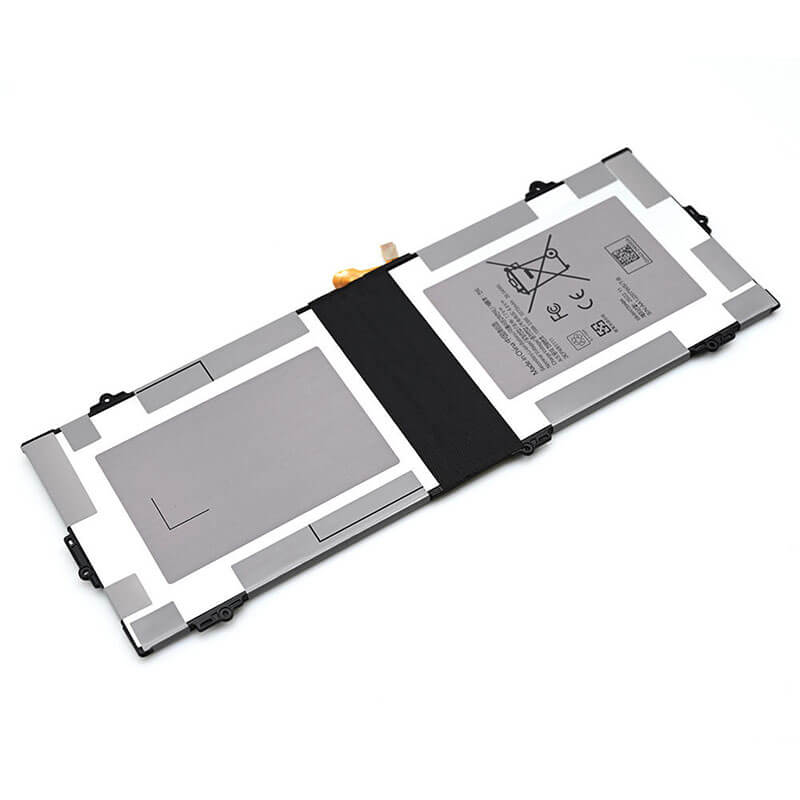
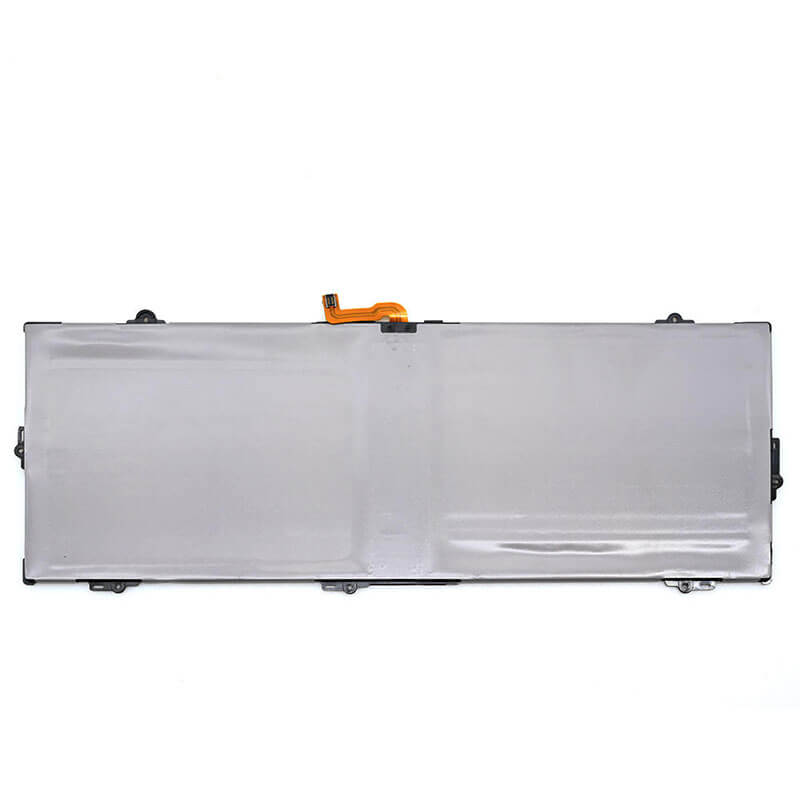
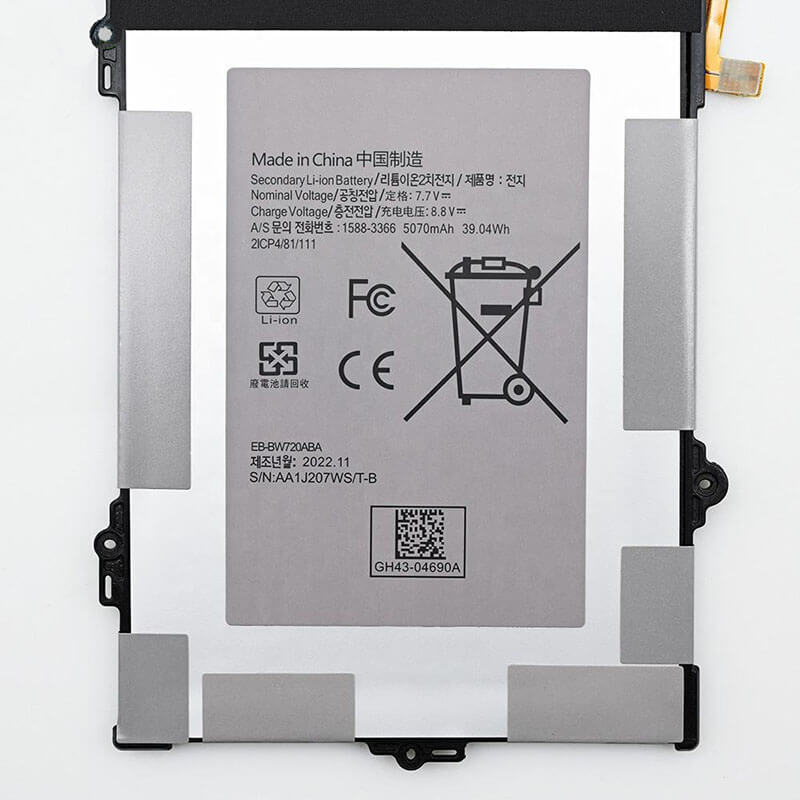
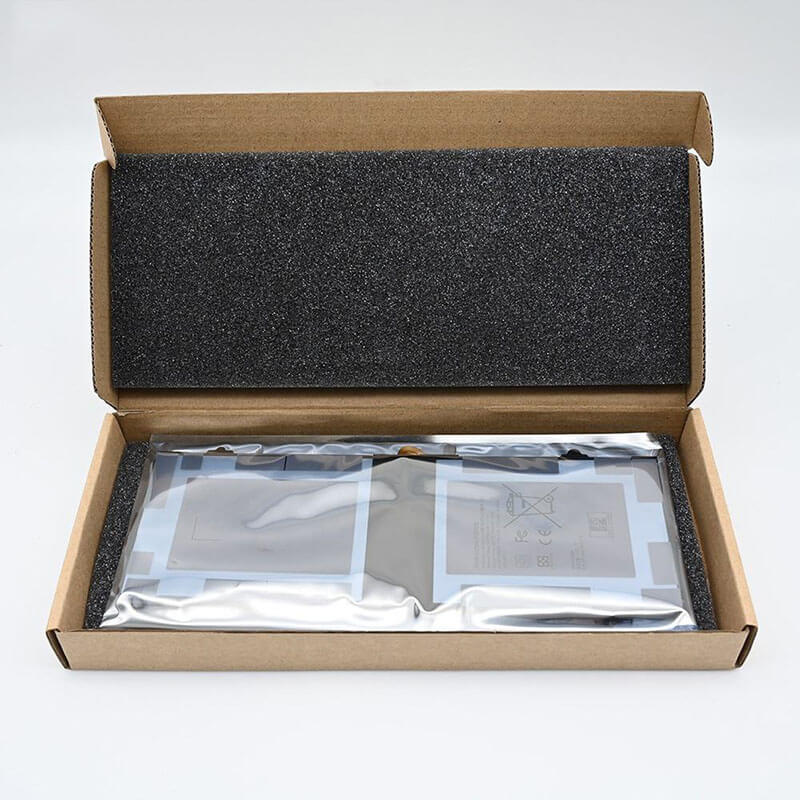
EB-BW720ABA Battery for Samsung Chromebook 4 XE310XBA XE350XBA | 7.7V 39Wh 5070mAh 2-Cell – HTJ
- Model Numbers: EB-BW720ABA Battery
- Battery Type: Li-ion Polymer (High-Density Grade A+ Cells)
- Voltage: 7.7V (Fully compatible with 7.6V)
- Capacity: 5070mAh / 39Wh
- Cells: 2-Cell
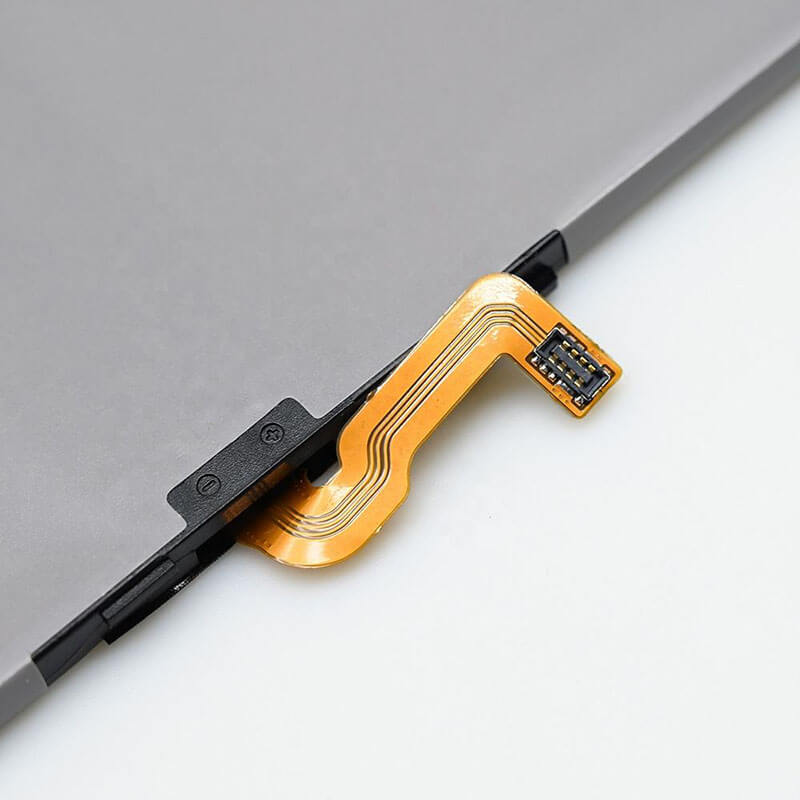
- Connector: 9-Pin Precision Digital Interface
- Condition: 100% Brand New from Factory
- Life Cycle: 600 – 1000 recharge cycles
- Multiple Protection: Over Current, Over Voltage, Over Charge & Discharge, Overheat, Short Circuit, ESD, EMI
- Color: Black
- Certifications: UL2054, CE, FCC, RoHS, UN38.3, MSDS, IEC62133
- OEM/ODM: Yes(Accepted)
- Warranty: 18 Months After Sales, 24/7 Email Support.
- Product Dimensions: 10.55 x 4.92 x 1.19 inches
- Item Weight: 9.1 ounces
EB-BW720ABA Battery for Samsung Chromebook 4 XE310XBA XE350XBA | 7.7V 39Wh 5070mAh 2-Cell
Detailed Product Specifications and Features:
Core Technical Parameters:
| Property | Specification |
|---|---|
| Model Numbers | EB-BW720ABA Battery |
| Battery Type | Li-ion Polymer (High-Density Grade A+ Cells) |
| Voltage | 7.7V (Fully compatible with 7.6V) |
| Capacity | 5070mAh / 39Wh |
| Cells | 2-Cell |
| Connector | 9-Pin Precision Digital Interface |
| Condition | 100% Brand New from Factory |
| Life Cycle | 600 - 1000 recharge cycles |
| Multiple Protection | Over Current, Over Voltage, Over Charge & Discharge, Overheat, Short Circuit, ESD, EMI |
| Color | Black |
| Certifications | UL2054, CE, FCC, RoHS, UN38.3, MSDS, IEC62133 |
| OEM/ODM | Yes(Accepted) |
| Warranty | 18 Months After Sales, 24/7 Email Support. |
| Product Dimensions | 10.55 x 4.92 x 1.19 inches |
| Item Weight | 9.1 ounces |
Technical Note:
Design Note: The EB-BW720ABA is a specialized internal battery designed for the energy-efficient ARM and Intel Celeron architectures found in Samsung Chromebooks.
Connector Note: This model features a high-precision 9-pin connector, which is essential for the ChromeOS “Power Manager” to report battery health and remaining runtime accurately.
Physical Note: The 2-cell flat configuration is designed to be ultra-lightweight, maintaining the portability of the Chromebook 4 series.
Important: Internal installation is required; please ensure the laptop is in “Battery Cut-off Mode” or fully powered down before opening.
Product Features:
- Battery Newest Premium Grade Cells
- Best Circuit Board
- Multiple command chip control, keep the battery stable charge and discharge;
- Over-charger protection and discharger protection, short-circuit protection, ensure fast charges and low power consumption
- Easy & Quick Installation
- Our battery is 100% compatible with the original battery and meets
- CE/FCC/ROHS/UL-certified standards. It is 100% new from the manufacturer and can support up to 1000 recharge cycles over the life of the battery
- Power Interface: Gold-plated connector points to ensure current transport excellently and serve stably.
- Enclosure: The enclosure is made of ABS + PC high-quality material, which has a high temperature-resistant function to protect your laptop from overheating
- Battery Buckle: The battery buckle is closely connected to the laptop, and the metal interface is stably powered
EB-BW720ABA Battery Battery Compatibility Laptop Model List:
1. Compatible Laptop Model List (Comprehensive)
| Category | Specific Models & Machine Types |
|---|---|
| Samsung Chromebook 4 (11.6") | XE310XBA Series:XE310XBA-K01US, XE310XBA-K02US, XE310XBA-K01UK, XE310XBA-KA1US |
| Samsung Chromebook 4+ (15.6") | XE350XBA Series:XE350XBA-K01US, XE350XBA-K02US, XE350XBA-K03US, XE350XBA-KA1US |
| Samsung Galaxy Book 12.0" | SM-W720, SM-W723, SM-W727, SM-W728:(Verify your original battery is EB-BW720ABA) |
| ⚠️ Absolute Incompatibility | NOT FOR: Samsung Chromebook 4 Go (XE340XDA/XE345XDA).NOT FOR: Galaxy Book2 (NP730/NP750). |
| Visual Check | Fits internal chassis where the battery is secured by 4 specific screw-mount tabs. |
2. EB-BW720ABA Battery Compatible Part Numbers (P/N List)
-
- EB-BW720ABA (Primary Marketing ID)
- BA43-00394A (Samsung Engineering Code)
- AA-PBMN2VN (Interchangeable P/N found in some XE350XBA batches)
Why Choose HTJ EB-BW720ABA 39Wh Battery?
- Precision 9-Pin ChromeOS Integration:
Chromebooks are sensitive to battery firmware. Our EB-BW720ABA uses a 1:1 replica of the original Smart-BMS, ensuring that the ChromeOS “crosh” battery test passes with 100% health and accurate cycle counting. - Optimized for Educational Durability:
Designed for the daily “charge-and-discharge” cycles of student life. We use Grade A+ cells that maintain higher capacity retention even after 500+ cycles, outperforming standard aftermarket alternatives. - Zero-Swelling Polymer Safety:
In the compact XE310XBA chassis, battery swelling can easily damage the trackpad. HTJ cells use high-grade vacuum-sealed laminate to prevent gas buildup, ensuring the battery remains flat and safe for the life of the device. - 18-Month Factory-Direct Warranty:
As a direct manufacturer, we guarantee the 5070mAh capacity. Each unit is tested for voltage stability and 9-pin signal integrity before shipping, backed by our industry-leading 18-month warranty.
How to Install Your New EB-BW720ABA Battery?
Replacing the internal EB-BW720ABA (9-pin) battery is a simple process for the Samsung Chromebook 4 series.
⚠️ Crucial Safety Preparation
- Shutdown: Power off your Chromebook and disconnect the USB-C charger.
- ESD Warning: Touch a grounded metal object to discharge static electricity before touching internal components.
- Tools: Phillips #0 screwdriver and a plastic prying tool.
EB-BW720ABA Battery Step-by-Step Installation Guide:
- Remove the Bottom Screws: Remove the screws from the bottom of the Chromebook. Note that some may be hidden under rubber feet.
- Pry the Case: Use a plastic prying tool to gently release the clips around the edges and lift the bottom cover.
- Disconnect the Connector: Locate the 9-pin battery connector. Use a plastic tool to lift the connector vertically out of its socket. Do not pull the wires.
- Remove the Battery: Unscrew the internal mounting screws and lift the old EB-BW720ABA out.
- Insert New Battery: Align the HTJ battery with the screw holes and tighten the mounting screws.
- Reconnect: Firmly press the 9-pin connector back into the motherboard socket.
- Reassemble: Snap the bottom cover back on and replace the external screws.
- Initial Calibration: Plug in your USB-C charger. Charge to 100%, then use the Chromebook until it reaches 5% to sync the new cells.
💡 Pro Tip:
If the Chromebook does not turn on immediately after installation, plug in the USB-C charger. Many Chromebooks require a “charger handshake” to exit shipping mode after a battery replacement.
FAQ (Frequently Asked Questions)
Q: Can I use this battery on an IBM or Lenovo laptop?
A: No. This is a proprietary Samsung 7.7V battery with a specialized 9-pin connector. It is physically and electrically incompatible with IBM or Lenovo systems.
Q: My Chromebook says “Battery not found” after installation. What should I do?
A: Most likely, the 9-pin connector is not fully seated. Open the case and press down firmly on the connector head until it clicks into place.
Q: Does this battery fit both the small 11″ and the large 15″ Chromebook 4?
A: Yes. Samsung used the same EB-BW720ABA battery for both the XE310 (11″) and XE350 (15″) versions of the Chromebook 4.
Q: My Chromebook is a “Chromebook 4 Go.” Will this fit?
A: No. The “Go” edition (XE340XDA) uses a different internal layout. This battery is strictly for the standard Chromebook 4 (XE310XBA) and Chromebook 4+ (XE350XBA). Please check the model code on the bottom of your device before ordering.
Q: Is this 9-pin connector compatible with the 12″ Galaxy Book Tablet?
A: Yes. The EB-BW720ABA used in the SM-W720 tablet utilizes the same 9-pin digital interface. However, because the tablet’s internal space is tighter than that of the 15″ laptop, ensure the flexible cable is folded gently according to the original battery’s orientation during installation.
Q: Why does ChromeOS show “Battery Health: 98%” on a brand-new battery?
A: This is normal behavior for ChromeOS. The operating system calculates health based on “Design Capacity” vs. “Full Charge Capacity.” After 2–3 full charge cycles, the BMS (Battery Management System) will calibrate, and the health reading will stabilize.
Laptop Maintenance Tips:
- New battery: For using a new battery, you’d better try a few cycles of discharging to 5%. then charging up to 95%. So that it can be activated completely
- Overuse: Do not always run a battery to 0%, as this would shorten its usage life.
- Charging sequence: When charging, first install the battery, then turn on the power. When fully charged, first cut off the power, then pull the power plug.
- Long-term storage: Please store the unused battery fully charged. (Charge it once a month.) Do not store at low power to prevent reducing the lifespan of a battery
- Charger: Do not replace the laptop adapter casually. If the original adapter cannot be applied due to malfunction or damage, please replace the models so as not to reduce the service life of the battery due to incompatibility.
【IMPORTANT】: Press [ Ctrl+F ] to find the laptop models.
Need a legacy/unlisted charger? Send your Samsung Laptop Battery specs or CONTACT US → We will source it for you!
We are a professional manufacturer in the field of laptop batteries, laptop adapters, and laptop keyboards. We are committed to providing high-quality, competitively priced, and superior performance batteries and the best service to customers.
Need Expert Help or Legacy Charger Sourcing? Contact Our Professional Technical Team Now!